Move from Excel to a personal training app: where should you start?
A gradual transition based on an active programme, a first client and a clear reference version.
Short answer
Move from Excel to a personal training app by identifying one client’s active programme and rebuilding a representative workout. Compare instructions, test phone access and check the feedback received by the trainer. In Adhérence, begin with that limited journey before expanding, preserving identifiable sources and an understood transition date.
To move from Excel to a personal training app, start with one client’s active coaching: the current programme, useful instructions and the next workout. Test the phone journey and your review of the feedback afterwards. A gradual transition lets you verify the process before moving your entire organisation into a new tool.
This guide addresses the change once you are considering a move. The Excel and Adhérence comparison helps with choosing a tool. Here, the task is to preserve useful work without maintaining competing programme versions or asking clients to understand several systems at the same time throughout the transition.
What should you move from the spreadsheet first?
Make an inventory of the present. For each relevant client, identify the current programme, active week, important adaptations and information needed for the next conversation. A folder containing years of material may include obsolete versions that do not help prepare the next workout and make the transition harder to explain or verify.
Separate what must be usable in the new app from what should remain accessible in appropriate archives. History deserves a considered retention approach; that does not mean every previous value must be re-entered into the current log. Explain the date from which new workouts will be recorded so that the different sources remain identifiable.
Choose the reference version as well. A file called “final” and another corrected after the last appointment may describe different programmes. Confirm the instructions the client actually follows before reconstructing their equivalent. This is also an opportunity to clarify details that had become implicit in a familiar spreadsheet rather than copying ambiguity into a different interface.
- Information
- Active programme
- Suggested approach
- Rebuild the version being used
- Check
- Exercises, sets and instructions agree
- Information
- Recent adaptation
- Suggested approach
- Preserve the useful instruction
- Check
- The client recognises the intended variation
- Information
- Older history
- Suggested approach
- Keep an appropriate archive
- Check
- Sources and dates remain identifiable
- Information
- Scattered conversation
- Suggested approach
- Retain only necessary context
- Check
- The information supports a current decision
| Information | Suggested approach | Check |
|---|---|---|
| Active programme | Rebuild the version being used | Exercises, sets and instructions agree |
| Recent adaptation | Preserve the useful instruction | The client recognises the intended variation |
| Older history | Keep an appropriate archive | Sources and dates remain identifiable |
| Scattered conversation | Retain only necessary context | The information supports a current decision |
How can you test without moving every client?
Prepare a limited trial using a representative programme. Choose a client who can provide feedback and explain what changes, when the trial begins and where to find the current instruction. The explanation is part of the transition. Features alone cannot establish that the person knows which version to follow at the next workout.
Start with a session containing the usual requirements: repetitions, load where relevant, rest and instructions. Compare the display with the original. One spreadsheet cell may combine a target, previous performance and a comment. Rebuilding it requires distinguishing those roles rather than transferring text without reviewing what each number and sentence is supposed to mean.
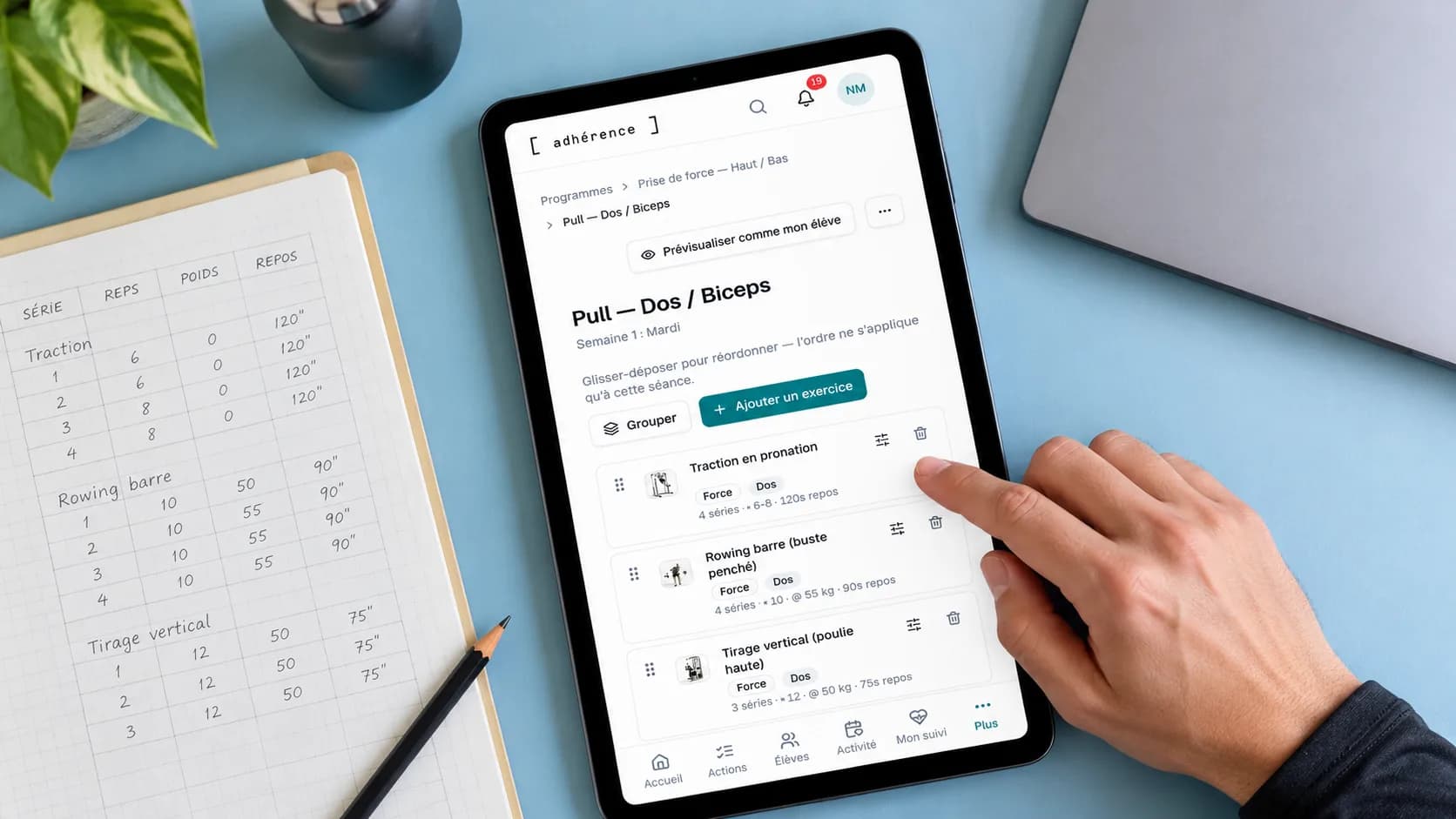
In Adhérence, create or adapt a programme and verify its prescription before assignment. This guide does not describe automatic import of every Excel file, PDF or historical record. The programme-building method helps translate the content into a structured, understandable workout rather than reproduce the spreadsheet’s visual layout without considering its meaning.
To prepare the trial, view the actual Adhérence personal trainer software screens: exercise preparation, set recording and priorities for the trainer to review.
What should you check during the client’s first workout?
Check the invitation and programme access on the phone the person uses. They should find the correct week and understand the next exercise. Ask them to record one action, then correct a simple mistake. That small trial identifies hesitation more precisely than a general tour through every available feature or a question about whether everything seems clear.
Define the expected feedback at the end. Some clients filled their spreadsheet afterwards; others recorded sets during training. Do not assume the habit changes immediately. Explain how you review information and which questions deserve contact before the next appointment, including a response period that fits the service you provide and can consistently maintain.
The mobile client journey guide details these checks. It distinguishes installation from usage and explains connection limits. A home-screen icon does not establish that all operations work offline. Test the downloaded programme and feedback according to their actual capabilities instead of treating installation as proof of complete availability.
How can you avoid maintaining two systems?
Set a clear transition point for the pilot client. From that date, specify where the active prescription lives and where new workouts should be recorded. The previous document may remain an archive; it should not receive corrections that silently contradict the version being used in the app without explaining which instruction now applies.
When you change an instruction during the trial, check the complete journey: the update, client access and understanding at the next workout. A programme visible in your workspace does not establish that the client identified the new instruction. Ask them to explain the next action when the change matters, particularly if the earlier version was familiar.
A useful transition has an active version, an understandable date and a verified next workout. The quantity of files moved does not, by itself, measure the quality of the transition or the clarity of the client’s next action.
Fictional example: rebuild a programme before expanding the trial
A trainer supports fifteen clients through several spreadsheets. He selects a three-session programme used by a willing participant. He preserves the sources, reconstructs the active workouts and compares each prescription. This illustrates a possible process rather than a customer outcome, a testimonial or a measured reduction in preparation time.
During the first session, the client finds the exercises but confuses an earlier load with the current target. The trainer clarifies the prescription and how to read the log. He checks the feedback received, then repeats the journey with a second profile whose equipment and recording habits differ. These observations reveal the explanation each person needs.
He expands the transition after identifying the support and preparation work involved. He does not promise a universal transfer within minutes. The test informs his actual organisation, including difficulties, before asking other clients to make a similar change. It also helps him decide whether the new workflow suits the service rather than just the demonstration.

How should you protect sources and client information?
Keep necessary documents in a suitable location and check they remain readable. The CNIL’s backup guidance supports creating and checking backups. Moving a file is different from preserving a copy whose content and recoverability you have verified. Make those distinctions explicit when organising material before changing the active workflow.
Limit transferred information to the coaching purpose, using the principles of purpose and minimisation as a reference. Not every private conversation belongs in the new programme. Define the archive’s role and retention approach instead of indefinitely duplicating client folders across devices, old sharing links and several overlapping working spaces.
Explain the change of support and check access. A document previously shared with several people should not become an unexamined template for the new tool’s permissions. The practical aim is to know where each necessary item lives and who is expected to consult it as part of the agreed service and the client’s current relationship with you.
When should you create an account for the trial?
You do not need to reorganise every folder before testing the journey. Prepare a representative workout, create an Adhérence account and start with demonstration data or an agreed pilot. You can then assess whether the tool fits your methods, clients and review capacity. Keep the first action small enough to complete and evaluate before expanding.
Invited client accounts are free. Trainers can begin without a credit card and with up to five clients on Free; check current features and limits on Adhérence pricing. Select a plan through the service you tested, distinguishing immediate requirements from possibilities you may not need yet. A larger feature list is not a substitute for that practical fit.
Frequently asked questions
Can Adhérence automatically import every Excel file?
This guide proposes a gradual reconstruction of active programmes rather than universal import of Excel files, PDFs or historical records. Check the actual possibilities for your format and compare the resulting prescription before assignment. Similar-looking documents do not establish that targets, previous results and comments have been interpreted correctly.
Must I re-enter all history before starting?
Define what needs to be usable now and what can remain in appropriate archives. A clear transition date identifies new entries without presenting older values as workouts performed in the app. Organise source retention according to the material’s usefulness and applicable framework rather than requiring complete historical re-entry as the first step.
How many clients should join the first trial?
Choose a scope you can support and observe, then expand when the journey is understood. One initial pilot and a second, different profile can reveal different needs. This is a transition method rather than a rule requiring the same number for every trainer, service or group of clients.
Key takeaways
Moving from Excel to an app starts with an active programme and a verified journey. In Adhérence, rebuild a workout, test client usage and review feedback before expanding. Preserve identifiable sources and one active reference. The trial should make the next workout clearer for both people rather than simply move a larger number of files.
Sources
Keep reading
Two related guides for turning an observation into a sustainable tracking method.