Mobile app for personal trainers: what should clients be able to do?
A practical phone-based trial from invitation to feedback that the trainer can read and use.
Short answer
Choose a mobile coaching app by testing the client journey on their phone: finding the programme, recording a set, completing the workout and sending useful feedback. Then check the trainer view, installation and offline limits. Adhérence is a mobile-friendly, installable web app with a free account for invited clients.
A mobile app for personal trainers becomes useful when clients can find their programme, record a workout and send feedback you can use. Test that journey on their phone, then check what reaches the trainer view. A long feature list on a sales page does not describe this everyday experience.
This guide concerns a shared tool for independent trainers and their clients. A consumer app offering generic workouts serves a different purpose. For the wider organisation of your business, start with the coaching software comparison. Here, the decision centres on what clients actually do before, during and after training.
What should an app do for the client?
Clients often open their phone between exercises, in a noisy space with limited time. They need to identify the current workout, understand the prescription and record what happened. An interface that feels comfortable at a desk can become awkward in those circumstances, particularly when someone is new to training.
Test the repeated actions: finding an instruction, checking rest, correcting a repetition count or explaining a replacement exercise. You must then distinguish planned work from recorded work. A completed workout status alone does not describe every set entered or the obstacle that affected the session.
Include a beginner in the test. Can they identify the starting point without remembering a lengthy demonstration? Can they find the instructions again after closing the app? The first experience should help them complete one useful action with support, then repeat it independently at their next visit.
Which journey should you test before choosing?
Run a complete trial using a short programme and demonstration data. Choose a phone representative of your clients’ devices. A presentation on a large, recent screen cannot establish readability, connectivity or recording comfort on the hardware they use. Check with the person who will carry out the actions.
- Action
- Open the programme
- What the client checks
- The currently assigned version
- What the trainer receives
- The reference programme
- Action
- Start a workout
- What the client checks
- Clear exercises and instructions
- What the trainer receives
- The context of planned work
- Action
- Record a set
- What the client checks
- Editable values and clear confirmation
- What the trainer receives
- The work actually entered
- Action
- Finish the workout
- What the client checks
- Useful effort and context feedback
- What the trainer receives
- Information for a review
- Action
- Answer a check-in
- What the client checks
- Identifiable questions and deadline
- What the trainer receives
- A response connected to coaching
| Action | What the client checks | What the trainer receives |
|---|---|---|
| Open the programme | The currently assigned version | The reference programme |
| Start a workout | Clear exercises and instructions | The context of planned work |
| Record a set | Editable values and clear confirmation | The work actually entered |
| Finish the workout | Useful effort and context feedback | Information for a review |
| Answer a check-in | Identifiable questions and deadline | A response connected to coaching |
Record where your intervention is needed. An initial explanation is reasonable; a manual correction after every workout deserves attention. Also introduce a deliberate mistake, such as an incorrect load or a workout opened too early. The client should understand how to recover without losing confidence in their record.
Native app or installable web app: what is the difference?
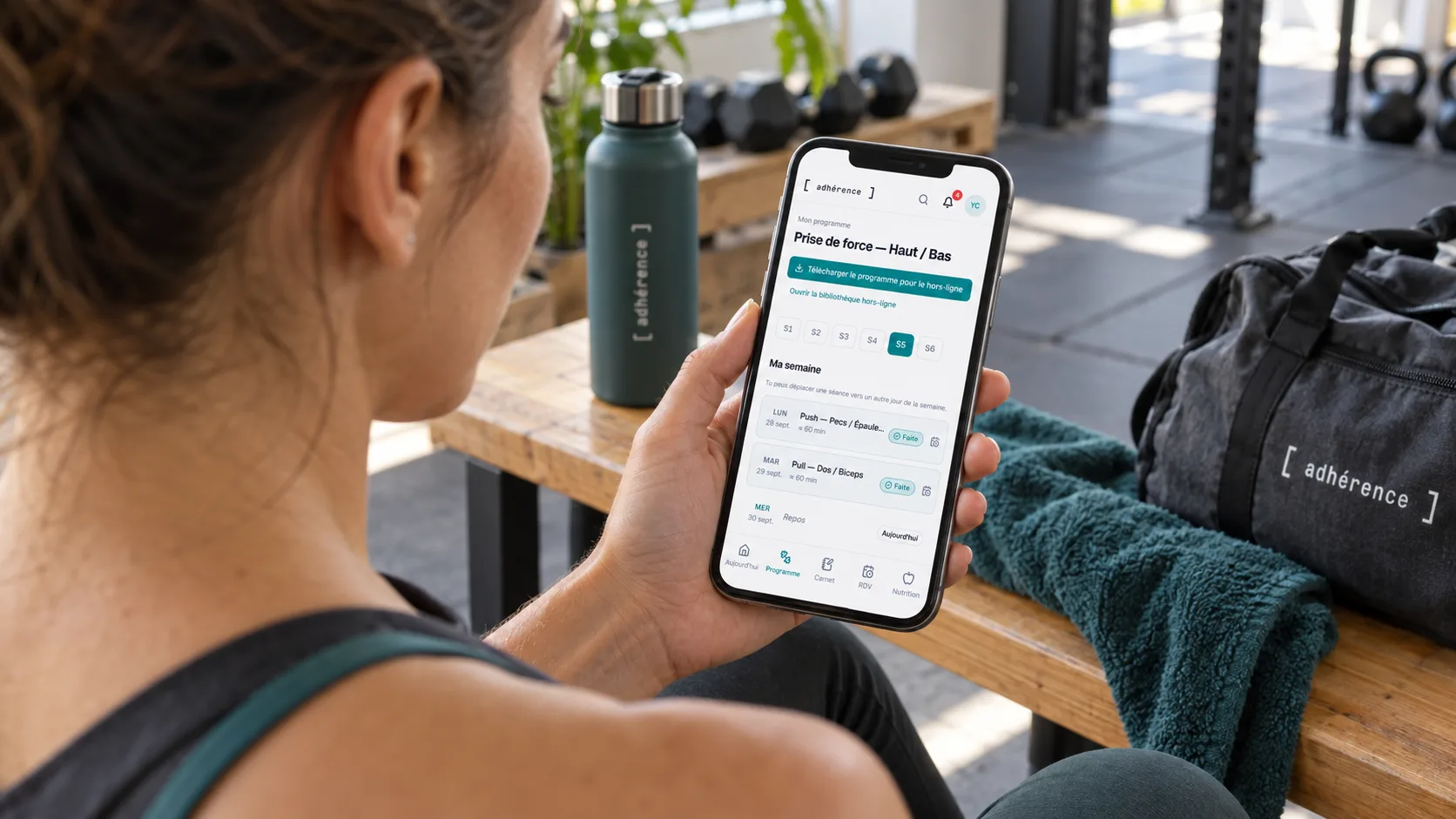
A native app is generally distributed through an app store. An installable web app starts in a browser and can have a home-screen shortcut. That access method alone does not determine the features, their quality or their behaviour without a connection. Assess the workflow rather than judging solely from the distribution format.
Adhérence is a mobile-friendly, installable web app. Its installation guide supports the process for different browsers and devices. Explain this clearly: clients do not need to search an app store for a native Adhérence application before they can start using their assigned programme and account.
Apple’s home-screen instructions and Google’s web app guidance describe paths that depend on the context. Menus and available options can differ. When a link opens inside a social network’s embedded browser, moving to the regular browser may be necessary before following the relevant steps.
What should you check for a gym with poor reception?
Separate programme access, recording and transmission to the trainer. A home-screen icon does not mean every feature works offline. Ask what must be downloaded beforehand and how the product explains unavailable operations. Repeat the test with the downloaded content instead of relying on an installation badge.
Adhérence offers programme downloading for its offline library. Test access to that content before relying on it in a gym with weak reception. Do not extend that capability to every operation: booking, sending a check-in and synchronisation need to be checked according to their actual behaviour.
Agree a simple response to interruption. Clients should know where to find available information and how to confirm later that their feedback is visible. Avoid interpreting a delayed record as a missed workout. A connection problem and an organisational obstacle require different conversations, even when both initially produce an empty entry.
A useful mobile trial covers three moments: what the client understands beforehand, what they can record during training and what the trainer receives afterwards. Installation makes access easier; it does not replace that trial.
How should you support the first Adhérence workout?
Begin with the invitation, account access and assigned programme. Invited clients use a free account, while trainers choose a plan for their business. Check current features and limits on the pricing page, especially when your service connects programmes, bookings and structured check-ins. Do not assume that all trainer features belong to every plan.
Demonstrate one complete recording action. The client reads the prescription, records a set and sees the confirmation. Then ask them to perform the next action themselves. This exposes hesitation more clearly than a general question about understanding. The initial consultation guide helps establish their needs before the demonstration.
Agree what you review and when. Loads and repetitions provide context without creating constant trainer availability. A time-sensitive question or an obstacle preventing the workout should not depend on an assumed immediate reading of the log. Explain the channel and response period that match the service you actually provide.

Fictional example: test before introducing the app to everyone
A trainer supports twelve clients, several of whom train independently. She prepares a short programme and trials it with two different profiles: someone comfortable using their phone and someone who prefers support at the start. This is an illustrative method, not a measured customer outcome or a product testimonial.
The first person records loads comfortably but forgets the final feedback. The second finds the programme, then hesitates when confirming a set. The trainer changes her explanation to address these separate obstacles and checks the next workout. She does not add reminders before understanding which action caused the difficulty.
In her trainer view, she checks the available records and the work involved in reviewing them. She chooses a realistic review rhythm and one question for missing context. The trial informs her organisation; it does not justify announcing an identical time saving for every trainer or client group.
How should you handle notifications and personal information?
Explain what reminders are for and make permissions understandable. Installing the app and allowing notifications are separate actions. A client may want a convenient shortcut without every alert. Test that situation instead of presenting notification permission as a requirement for opening and following the programme.
Collect information relevant to the agreed service. The CNIL’s data minimisation principles support limiting information to its purpose. A longer form does not improve coaching if it gathers details you cannot use or explain. Keep the requested feedback proportionate and discuss it with the person providing it.
To assess adoption, distinguish access, recording and conversation. A download or opening does not establish workout completion. Cross-check the log with client feedback. The monthly coaching review can then help discuss continuity over a defined period, including practical difficulties that app usage figures would not explain.
Checklist for choosing a mobile coaching app
Frequently asked questions
Do clients need to pay to use Adhérence?
Invited clients have a free account. Trainers choose a plan suited to their business. Consult current pricing for limits and features: free client access does not mean every trainer function is included in every plan. Check the activities your service requires before introducing the app.
Does an installable app work completely offline?
That depends on the feature. Test downloaded content and operations requiring connectivity. In Adhérence, use the offline library for the prepared programme and verify feedback transmission separately. Installation alone cannot establish complete offline availability or the behaviour of every connected function.
How can I tell whether clients actually follow their programme?
Review recorded work and discuss missing information. Opening an app is insufficient evidence, and missing entries can have several causes. Check understanding, circumstances and practical obstacles before changing the programme or reminders. Ask a focused question when the log cannot explain what happened.
Key takeaways
Choose a mobile app through the client journey and trainer review. Test errors, installation and connection limits. In Adhérence, begin with an assigned programme and a supported recording action, then organise feedback reading. The tool supports continuity when both people understand the next action and how the information will be used.
Sources
- Add a website to the iPhone Home Screen · Apple Support
- The six core GDPR principles · CNIL
- Adhérence plans and features · Adhérence
Keep reading
Two related guides for turning an observation into a sustainable tracking method.