Excel vs Adhérence: which tool for programs and client tracking?
Spreadsheet freedom and a specialised journey: compare recording, interpreting results and maintaining your system.
Short answer
Excel suits custom calculations and flexible analysis. Adhérence is more suitable for preparing strength programs, assigning them and reviewing recorded workouts in one journey. Compare mobile recording, the distinction between targets and results, and maintenance work before choosing.
Excel or Adhérence for personal trainers? Excel remains useful for custom calculations, flexible analysis and a tracking system you maintain yourself. Adhérence is more suitable when you want to prepare strength training programs, assign them to clients and review recorded workouts in one journey. The decision depends on the quality of data entry and the work required to interpret the records.
This comparison is written by Adhérence’s publisher. The features mentioned were checked on 1 October 2026. Examples are fictional, and the limitations discussed concern a coaching workflow rather than every capability of a spreadsheet.
A complete spreadsheet can still contain ambiguous information. Before adding another column, check that you distinguish what was prescribed, what was performed and what has not yet been recorded.

When is Excel useful for a personal trainer?
A spreadsheet lets you arrange columns, calculations and charts around your method. For budgeting, testing load progression or analysing an export, this freedom can be practical. You choose which details and ratios to retain.
Excel can also hold a training program: exercises, sets, repetitions, weights and comments. If clients understand the document and you can retrieve their feedback quickly, that arrangement may fit your service.
However, familiarity for the trainer is different from ease for the client. You know the tabs because you created them. A new client needs to learn the entry convention, colours and location of their results. Assess that learning effort before treating your own confidence with the workbook as evidence of usability.
Does Excel require emailing separate copies?
No. Microsoft documents co-authoring a shared workbook, including suitable cloud storage and compatible versions. Exchanging attachments is therefore not an unavoidable product limitation.
If you still use several copies, first examine that arrangement. A shared file, common convention and clear entry areas may resolve some problems without changing software.
The comparison with Adhérence concerns a different question: who defines and maintains the tracking rules? In Excel, the trainer designs the model. In Adhérence, programs, assignments and workout records belong to an established coaching framework. Choose based on how much of that framework you want to build yourself.
Why separate prescribed and completed data?
Fictional example: Karim should perform three sets of ten repetitions. In his spreadsheet, he replaces “10” with “8” after a difficult set. His trainer sees eight repetitions but cannot tell whether this is an updated instruction or the actual result.
A spreadsheet can avoid that ambiguity with separate columns. You then need to define their use, protect relevant areas and explain the difference. The problem comes from the chosen model rather than an inherent inability of Excel.
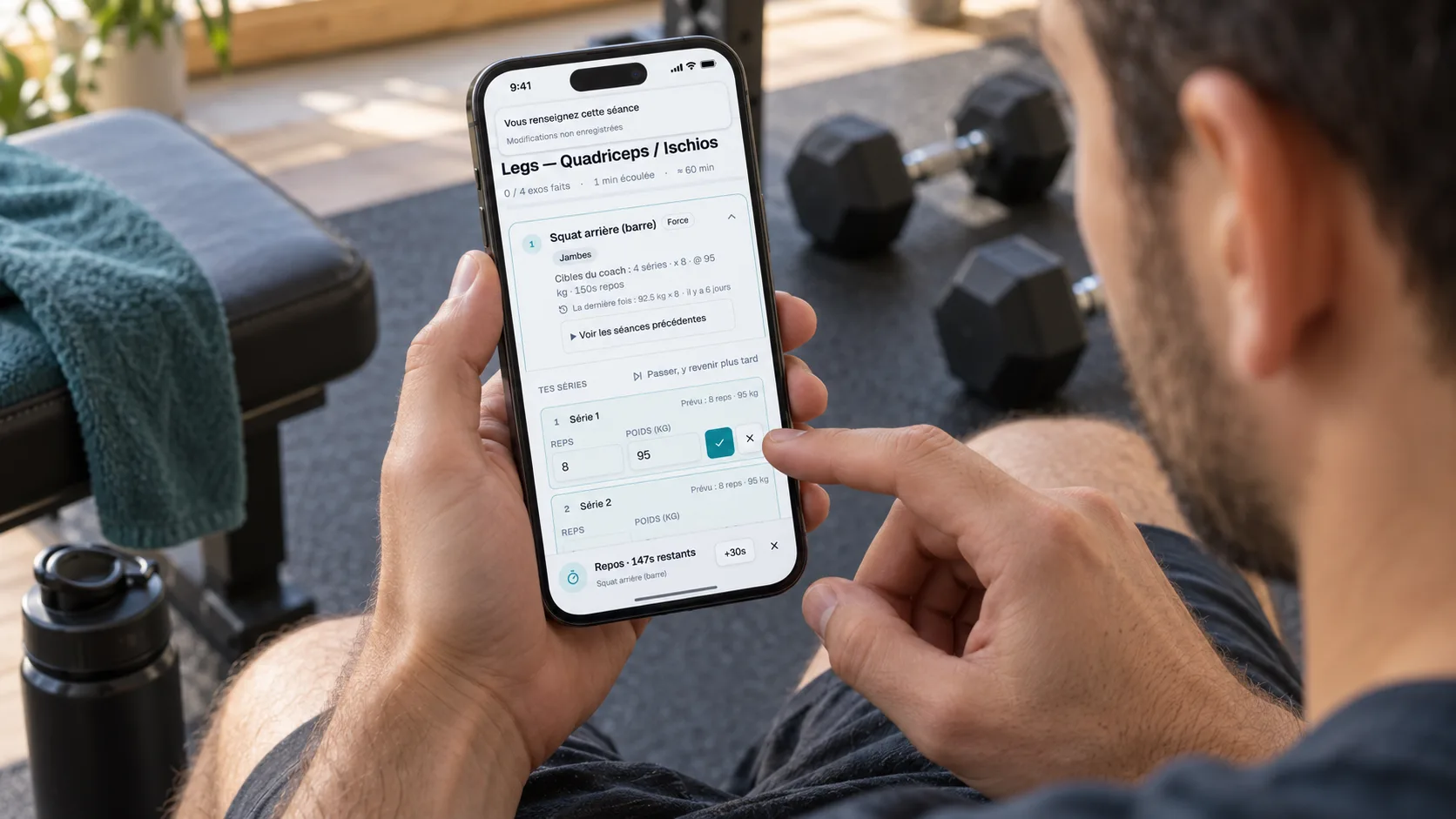
Adhérence provides a workout journey with trainer targets and sets entered by the client. That separation helps interpret the difference between prescription and performance. The trainer still needs to check context before increasing, maintaining or reducing difficulty. Clear structure supports judgement without replacing it.
Which practical tasks should you compare?
Choose repeated tasks and test them during a representative week. Preparing a program is only part of the work: you also need to share it, collect records and decide what to adapt after training.
- Task
- Flexible calculations and analysis
- Excel
- Customisable formulas, tables and charts
- Adhérence
- Metrics focused on coaching follow-up
- Task
- Create a program
- Excel
- Workbook template to organise
- Adhérence
- Program builder and exercises
- Task
- Separate prescription and performance
- Excel
- Columns and rules to define
- Adhérence
- Targets and workout records are distinct
- Task
- Enter data between sets
- Excel
- Depends on the template and mobile usage
- Adhérence
- Dedicated client recording journey
- Task
- Review several clients
- Excel
- Summary to build and maintain
- Adhérence
- Adherence tracking view
- Task
- Customise without a framework
- Excel
- Broad freedom of calculation and structure
- Adhérence
- Specialised training framework
| Task | Excel | Adhérence |
|---|---|---|
| Flexible calculations and analysis | Customisable formulas, tables and charts | Metrics focused on coaching follow-up |
| Create a program | Workbook template to organise | Program builder and exercises |
| Separate prescription and performance | Columns and rules to define | Targets and workout records are distinct |
| Enter data between sets | Depends on the template and mobile usage | Dedicated client recording journey |
| Review several clients | Summary to build and maintain | Adherence tracking view |
| Customise without a framework | Broad freedom of calculation and structure | Specialised training framework |
Use these differences to choose according to your practice. If your central need is highly specific analysis, keep the spreadsheet for that task. If you mainly need consistent data entry and tracking connected to programs, try Adhérence’s specialised journey. Examine what happens when a client misses a recording or needs an adjustment.
How should you assess data entry on a phone?
Ask a client to record a workout without explaining every step. Observe whether they scroll across several columns, zoom to read instructions or hesitate between weeks. These difficulties can occur in a file that looks well presented on a computer.
In Adhérence, the client finds the workout and exercises in their space. Check that they understand targets and set recording. A dedicated journey still needs a clear introduction when coaching starts.
The useful criterion is more than “the file opens.” It is whether the client can leave understandable records during a real workout. Note recurring questions and adjust the organisation if the same errors persist. Keep entry requirements proportionate so that recording does not distract from training.
Does a blank cell mean the client missed training?
No. It may indicate an uncompleted workout, forgotten entry or an access issue. Define these cases in your system. Missing information should not automatically become a conclusion about motivation.
Adhérence brings recorded tracking together to help review adherence. Use the view to decide which question to ask, then verify the context. Having a metric does not make every record complete.
The guide to seven useful client-tracking metrics explains how to connect information to decisions. Look for an interpretable trend and a next action rather than a table filled for its own sake. Repeated missing records may require improving the recording routine before changing the program.
How can you protect formulas and information?
Microsoft offers different levels of protection in Excel. Worksheet protection can restrict cell changes; it is not, by itself, a confidentiality measure. Distinguish preventing entry mistakes from controlling file access.
For your template, define which areas clients can change and check who can open the document. Avoid placing several individual client records in a file accessible to everyone simply because they occupy different tabs.
In Adhérence, clients use their space and programs assigned within the coaching relationship. Also check the correct recipient and shared information. This article compares journeys; it does not certify security or legal compliance. Review the actual setup you intend to use in either system.
How can you compare costs without overstating savings?
Include the subscription you already use, model construction time and maintenance. Also observe re-entry of data received by message. A file that costs nothing extra to share may require recurring work; a subscription can also add learning time.
Adhérence lets you start on Free with up to five clients and no credit card. Check the current plans for your needs. Compare the full cost of your method and what you observe during a trial.
Do not project a result from one simple client record onto every client. New clients, complex programs and missing data change workload. The guide to a trainer’s client capacity helps keep that assessment realistic. Include a week with adjustments in the comparison, not just a week when every workout goes as planned.
How can you move from Excel to Adhérence?
Start with active programs. Keep archives and specific analyses in their useful format. The objective is to improve the next coaching week rather than reproduce every historical cell.
- Clean the template. Separate instructions, results and internal comments.
- Prepare exercises. Check names and targets before recreating a week.
- Assign the program. Invite a few clients and explain the journey.
- Test recording. Review a workout that was actually entered.
- Check your review. Compare clarity and the adjustments you can make.
This approach does not assume automatic Excel workbook import. Allow time for content transfer and preserve useful historical information. If you are also considering a page-based workspace, the Notion vs Adhérence comparison covers a different way to structure follow-up. Give clients an agreed date for the new recording routine.
Frequently asked questions
Must I stop using Excel for everything?
No. Keep budgeting calculations and specific analyses in Excel, then use Adhérence for active programs and recorded workouts. Define where each type of information belongs so two competing training histories do not develop.
Can Excel suit the first few clients?
Yes, if the template is understandable, accessible and reliable. Switching becomes relevant when searching, corrections or mobile entry complicate essential tracking tasks. The number of clients alone does not decide.
Is software enough to improve consistency?
A clear journey can support follow-up, but it does not replace a realistic program and your coaching. Check usage and client obstacles before attributing a change in consistency to the software.
- Are targets distinct from actual results?
- Can the client record a workout on their phone?
- Does missing information remain identifiable as missing?
- Are formulas and access controlled separately?
- Can I review several records without repeated re-entry?
- Have I retained analyses for which Excel remains useful?
Key takeaways
- Excel offers flexible calculation and modelling.
- Adhérence connects the program, workout records and tracking view.
- Compare mobile entry, prescribed versus completed data and maintenance.
- Transfer active programs gradually and retain useful spreadsheet analyses.
Sources
- Collaborate on Excel workbooks with co-authoring · Microsoft Support
- Protection and security in Excel · Microsoft Support
- Personal training software: programs and client tracking · Adhérence
Keep reading
Two related guides for turning an observation into a sustainable tracking method.