Programme templates for personal trainers: how do you duplicate and personalise a cycle?
From a template to an assigned copy: check content, destination weeks and the client journey before the first workout.
Short answer
A programme template gives personal trainers a structure to adapt to the client’s context. In Adhérence, distinguish the catalogue, duplicating your own programme and copying a week. Name the new copy, review exercises and targets, then check assignment and the client’s view before the cycle starts.
A programme template for personal trainers should reuse a structure you understand, then help you adapt it to one client. Its value becomes concrete when you can explain what stayed, what changed and how the client will complete the first week. In Adhérence, distinguish the ready-to-adapt catalogue, your own programmes and copies prepared for a new cycle. Reuse and identical prescription for every person are different decisions.
What should a reusable programme template contain?
Before duplicating, check the template’s purpose: intended starting audience, equipment, weekly organisation, workout count and useful instructions. You should be able to explain when it is a relevant starting point. A name such as “Programme A” will not help you recover that context several weeks later.
Separate structure from individual choices. Workout order and some exercises can provide a base; goals, experience, constraints and feedback need another review. The personalised programming guide covers that step. This article concerns organising templates and copies, rather than prescribing a universal training plan or claiming that one layout fits all coaching services.
How do you duplicate a programme in Adhérence?
Duplicating an existing programme creates a new copy with its workouts and no assigned client. Give the copy a name that identifies its use: a new cycle, an equipment variant or a programme prepared for a particular start. Review the content before assignment. Creating the copy does not establish that its first week is ready to follow.
The capture below shows the actual demo-account duplication dialogue. Its wording explains that workouts are copied and no client is assigned. Those are useful checks: the content has been reused, but the client should not be assumed to have access before assignment. You can inspect and adapt the copy while keeping the original programme identifiable.
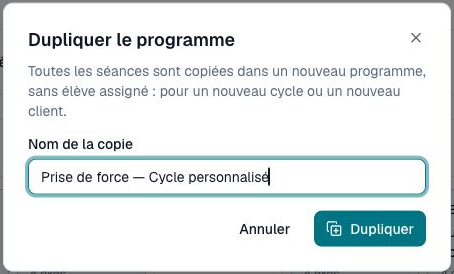
For a first test, start with a programme you know and keep the scope limited. Compare the copy with its source, preview one workout and explain the client’s next action before reorganising your full roster.
Catalogue, personal template and client copy: what differs?
A catalogue programme is a starting point to examine. In Adhérence, it must become a copy in your workspace before you adapt and assign it. Your own programmes can also provide references for later cycles. In either case, ready-to-copy content does not replace reviewing the client’s needs or deciding whether the starting structure makes sense.
- Need
- Explore a ready-to-adapt structure
- Starting point
- A catalogue programme available in your plan
- Check after copying
- Create your copy and review the content
- Need
- Prepare a new cycle
- Starting point
- One of your existing programmes
- Check after copying
- Name, duration, workouts and initial absence of assignment
- Need
- Reuse a week
- Starting point
- A source week in the programme
- Check after copying
- Destination weeks and existing content
- Need
- Start a client
- Starting point
- A programme adapted to their constraints
- Check after copying
- Assignment and access to the next workout
| Need | Starting point | Check after copying |
|---|---|---|
| Explore a ready-to-adapt structure | A catalogue programme available in your plan | Create your copy and review the content |
| Prepare a new cycle | One of your existing programmes | Name, duration, workouts and initial absence of assignment |
| Reuse a week | A source week in the programme | Destination weeks and existing content |
| Start a client | A programme adapted to their constraints | Assignment and access to the next workout |
The Adhérence plans describe the ready-made catalogue and other features. Do not confuse availability of your own programmes with access to every system template. Use the trial to inspect the journey before choosing the feature scope that fits your service.
What should you personalise before assignment?
Start with the initial consultation information that affects a decision: availability, equipment, experience, preferences and independence. Compare it with the selected template. Then check cycle duration, workout dates, exercise understanding and the instructions the client will read on their phone.
Review the targets exercise by exercise. A copied structure may retain settings that made sense in an earlier cycle. Change what needs changing and explain why. If an exercise is replaced, review the associated instructions too; a new exercise name with old contextual advice can leave the client uncertain about what is expected.
Finally, preview the workout as the client. That does not independently validate the prescription, but it can reveal presentation problems: an unclear title, unavailable equipment, an instruction that is difficult to follow or a next workout that is hard to identify. Test what the person can actually read before asking them to train from it.
How can you copy weeks without replacing the wrong content?
Copying a week helps build the next part of a cycle with its exercises and targets. In Adhérence, destination selection identifies weeks already containing workouts. A confirmation explains when their content will be replaced; completed workouts are preserved. Read that information before confirming, especially when the programme is already in use.
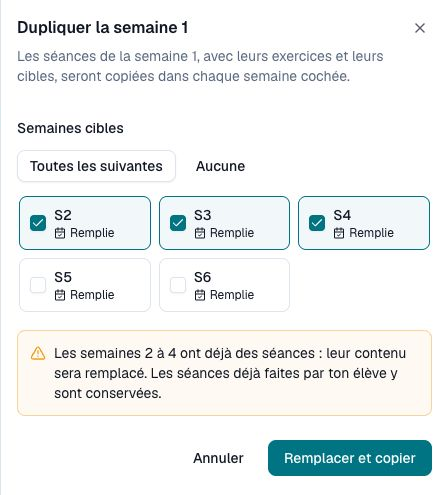
Do not treat copying as automatic progression. Review each affected week afterward and adjust settings according to your coaching intention. Check what remains ahead for the client as well. A duplication control reproduces content; it does not decide the appropriate load, volume or progression for a person. That distinction should remain clear when you explain the next cycle.
Fictional example: prepare two versions of one cycle
Imagine a trainer with a strength-training base, one variant for a fully equipped gym and another for limited equipment. They keep a reference programme, create a clearly named copy and review exercises and instructions. This example demonstrates a process; it does not establish a measured time saving or training outcome.
Before assignment, the trainer checks the first workout with the relevant client. One person reports an additional equipment difference, so their copy is adapted before starting. At the next review, the trainer compares prescription with the recorded sets. The template supported preparation, while individual decisions remained attached to the programme actually being used.
How do you keep a template library understandable?
Choose a naming convention that distinguishes references, variants and active cycles. It can identify format, equipment and period without including unnecessary personal information. Keep enough detail to find the right starting point without turning programme titles into client records. A small, understandable library is easier to review than several similar copies whose purposes are unclear.
After a cycle, review what should be reused. An adjustment for one person should not silently become the rule for every template. Keep a clean reference and explain in your working method why the base changes. Reviewing completed training and preparing upcoming prescription require different questions, even when the same programme screen supports both.
The French data-protection authority recommends limiting information to its purpose. A reusable template does not need the name, measurements or private context of the client who helped test it. Reuse a programme support, with personal information kept in the appropriate client relationship.
- Are the template’s purpose and limits clear?
- Does the copy have a name that helps me find it?
- Have equipment, duration, workouts, exercises and targets been reviewed?
- Do selected destination weeks already contain workouts?
- Does the replacement warning match my intention?
- Have I tested the client’s view before assignment?
- Is the template separate from private client information?
Frequently asked questions
Can you send the same template to all clients?
A structure can be reused, but its suitability needs checking for each person. A copy and preview do not replace the consultation or discussion of the client’s actual constraints.
Does duplicating automatically assign the new programme?
A copy of an existing programme is created without an assigned client. Review it, adapt it and check assignment before asking the client to start the cycle.
How can you test without rebuilding the whole library?
Create a coach account and try copying a known programme with one representative workout. The trial lasts 14 days without a card; Free then supports getting started with up to 5 clients. Check plans for the catalogue and advanced features.
Key takeaways
- A reusable template is a starting point with an understood context.
- Distinguish catalogue use, programme duplication and week copying.
- Review targets and destination weeks before assignment.
- Test the Adhérence client journey with one limited cycle first.
Sources
- The six core GDPR principles · CNIL
- Personal training software: programmes and client tracking · Adhérence
- Adhérence plans and features · Adhérence
Keep reading
Two related guides for turning an observation into a sustainable tracking method.