Record a client workout: how should trainers organise in-person logging in Adhérence?
Check who is recording, enter observed facts and hand over control: a practical journey for in-person coaching.
Short answer
To record a client workout in person, check the client, programme and who is keeping the record. In Adhérence, detailed accompanied logging is separate from overall confirmation of completion. Record observed or communicated facts, then check saving and handover before finishing the workout.
Recording a client’s workout from your coach account can be useful during an in-person appointment: observed performance stays in the training record without asking the client to enter it again afterward. The important questions are who records, for which client and using which information. In Adhérence, detailed accompanied logging and a simple confirmation of completion are separate journeys. Choose the one that matches what you can actually document.
When should the coach record a workout?
Agree this role at the start of the service. During an in-person workout, you can record observed sets between efforts. When the client trains independently, their own journal provides a different source of feedback. Make the information easy to retrieve without merging a coach’s observation with a statement made by the client.
Explain how you will avoid duplicate entry. Two people opening the same workout on their phones should not assume they can both change its sets at once. Decide who is keeping the record and how control will be handed back. That small agreement makes the history easier to interpret when coaching alternates between appointments and independent training.
How do you access accompanied logging in Adhérence?
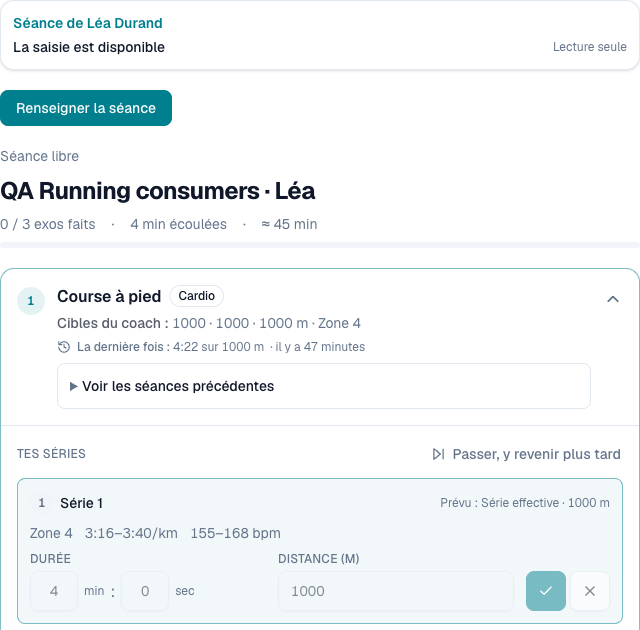
The journey starts from the client record through “Accompany a workout”. The coach chooses a workout from the assigned programme or uses the available standalone-workout journey. Check the client, programme and workout before recording. Opening a page alone does not establish that you have taken control to edit.
The interface identifies the person and recording state. The capture below shows an actual test environment in read-only mode before control is taken. “Record the workout” indicates an available next step; the displayed performance is fictional. This distinction prevents a consultation screen from being presented as evidence of a workout already recorded by the coach.
For a first trial, prepare a simple programme, invite one client and check the journey together. The client-tracking guide explains how to review workouts, consistency and context before deciding what to change.
What should you record during an in-person session?
Record performance actually completed and check the units. A programme’s target load is not automatically the load used; prescribed repetitions do not prove that a set was completed. When you have not observed or confirmed a value, do not turn it into a certain result simply to fill the training record.
Effort communicated orally remains the client’s feedback, even when you type it. A coach observation serves another purpose: an instruction to clarify, a contextual adjustment or something useful for the next discussion. Clear authorship makes the history easier to understand, particularly when the client uses several training formats between appointments.
- Information
- Workout target
- Who supplies it?
- The prepared programme
- What the coach checks
- Current instruction and expected unit
- Information
- Completed set
- Who supplies it?
- Observation or confirmed entry
- What the coach checks
- Actual value and the relevant set
- Information
- Client’s perceived effort
- Who supplies it?
- The client, possibly orally
- What the coach checks
- Meaning of the scale and timing of feedback
- Information
- Shared observation
- Who supplies it?
- The coach
- What the coach checks
- Usefulness to the client and the next decision
| Information | Who supplies it? | What the coach checks |
|---|---|---|
| Workout target | The prepared programme | Current instruction and expected unit |
| Completed set | Observation or confirmed entry | Actual value and the relevant set |
| Client’s perceived effort | The client, possibly orally | Meaning of the scale and timing of feedback |
| Shared observation | The coach | Usefulness to the client and the next decision |
The RPE and RIR guide helps clarify effort vocabulary. Avoid treating a target, overall workout difficulty and an interpretation of fatigue as the same measure. The fact that one interface can display several types of information does not remove the need to explain what each one means.
How do you hand recording between coach and client?
Adhérence provides an explicit handover for accompanied workouts. Before releasing control, check that useful entries are saved and the displayed state matches your intention. On the other phone, review the recorded workout before continuing. An old local draft should not be treated as the newest version by default.
Handover clarifies who can record at that moment. It should not be described as unrestricted simultaneous editing of the same fields. If the other phone is unavailable, saved information remains the starting point to check. Do not promise that every draft on an individual device has already been transmitted. The visible recording state matters more than an assumption based on a button previously pressed.
What belongs in a shared coach observation?
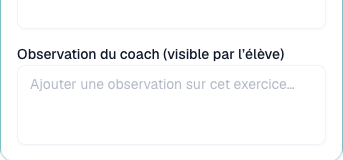
A shared observation should help the next workout or conversation. Write a concrete sentence the client can understand: an agreed instruction, equipment used or a point to revisit. Avoid personal judgements and private details unrelated to coaching. The field is not a place to establish a diagnosis or make an unsupported interpretation about the person.
The next capture shows the observation field explicitly described as visible to the client, in the same demonstration journey. It remains separate from personal notes. Its presence does not allow the coach to rewrite a client’s private words or invent effort feedback that was never communicated.
What differs between confirming completion and recording sets?
An overall confirmation says that a workout happened without inventing missing sets, loads or perceived effort. Detailed logging describes performance actually entered. Both can inform activity review, but they do not provide the same detail for analysing progression. Read the recording source before comparing an apparently complete workout with another session containing measured sets.
When the appointment also exists in the calendar, use the explicit linking supported by the relevant journey, when available. An assumed date match does not replace checking the workout and appointment. Keep that sporting record separate from payments and pack credits as well: recording training alone does not describe every related commercial operation.
Fictional example: an in-person start followed by independent training
Imagine a client who completes one workout with the coach and another independently. During the appointment, the coach checks the assigned workout and takes control to record observed sets. They add a short shared instruction, confirm saving and explain what the client will find in their training record.
For the independent workout, the client enters their own results. At the next conversation, the coach distinguishes observed performance from client-entered feedback. They review an equipment difference before choosing an adjustment. This example illustrates a hybrid coaching organisation; it does not demonstrate a measured time saving or training outcome.
What should you check before finishing?
Review the client, workout, sets and observations, then check completion confirmation. A finished session should not be described as an unrestricted draft that can always be reopened to correct any field. If something appears inconsistent, retain the context and use the options actually offered instead of inventing a replacement history.
The French data-protection authority explains necessary collection and transparent use. A shared record can remain useful with little free text when each observation supports an understandable action. Respecting that boundary also helps maintain trust about who can read which information and why it was recorded.
- Have I checked the correct client, programme and workout?
- Does the recording state identify who currently has control?
- Do entered performances correspond to observed or confirmed facts?
- Is the client’s feedback separate from my observation?
- Have I checked saving before handover or completion?
- Is the sporting record separate from payment and pack accounting?
- Does the client know what they will find in their training record?
Frequently asked questions
Can the coach fill in the record for the client?
Accompanied logging lets the relevant coach record the workout within that coaching relationship. It does not give access to the client’s private workouts or every relationship with another coach.
Does a confirmed workout automatically contain performances?
No. Overall confirmation and detailed logging are separate. A workout confirmed without set data should not be presented as a measurement of load progression or a personal record.
How can you test before using it across your roster?
Create a coach account and check one workout with an invited client. The trial lasts 14 days without a card; Free then supports getting started with up to 5 clients. Check plans for advanced functions.
Key takeaways
- Choose completion confirmation or detailed logging according to the available facts.
- Check the person recording and saving before handing over control.
- Keep targets, results, perceived effort and coach observations distinct.
- Test a first Adhérence journey with one client before extending it.
Sources
- The six core GDPR principles · CNIL
- Personal training software: programmes and client tracking · Adhérence
- Adhérence plans and features · Adhérence
Keep reading
Two related guides for turning an observation into a sustainable tracking method.