Automating personal training follow-up: which tasks should you choose?
Begin with a useful request, choose its rhythm and organise response reading before adding more rules.
Short answer
Automate client follow-up by choosing a repeated task with a clear trigger, recipient and next action. In Adhérence, scheduled check-ins, reminders and priorities can prepare your review. Check dates and exceptions, then read the context before contacting a client or changing their programme. A useful rule includes a realistic plan for handling the response.
To automate client follow-up as a personal trainer, start with a repeated task whose rule you can explain: requesting a check-in, reminding someone of a deadline or surfacing an observation for review. Define the recipient, timing and review process. Automation becomes useful when it prepares an action you know how to handle in your service.
Before adding reminders, choose what you will read and when. This guide complements the client tracking metrics guide by organising the tasks surrounding collection and review, including what happens after a response arrives.
Which coaching tasks can you automate first?
List repeated actions from a real working week. Preparing a familiar check-in request, finding people to contact and checking deadlines are different tasks. For each, describe the trigger and the information needed to decide what follows. This helps you select a specific process rather than adopt a general promise that everything can run by itself.
Begin with a case whose exceptions are understandable. A recurring request with an explicit deadline is easier to explain than messages triggered by conditions nobody can review. Clients should know why they receive a request and what their answer will support. Keep the first rule narrow enough that you can follow the complete journey.
- Task
- Check-in request
- Rule to define
- Schedule, questions and deadline
- What the trainer reviews
- Responses and their context
- Task
- Deadline reminder
- Rule to define
- Relevant item and recipient
- What the trainer reviews
- The current situation before another contact
- Task
- Follow-up signal
- Rule to define
- Observation requiring a review
- What the trainer reviews
- Possible explanation and next action
- Task
- Group information
- Rule to define
- Audience and content to confirm
- What the trainer reviews
- Relevance to each recipient
| Task | Rule to define | What the trainer reviews |
|---|---|---|
| Check-in request | Schedule, questions and deadline | Responses and their context |
| Deadline reminder | Relevant item and recipient | The current situation before another contact |
| Follow-up signal | Observation requiring a review | Possible explanation and next action |
| Group information | Audience and content to confirm | Relevance to each recipient |
Delegated work must remain visible in your organisation. If a received response has no review slot, the difficulty has moved rather than disappeared. Set a review period and a reasonable priority, then examine the workload created by the first requests before adding further rules, audiences or questions to the same process.
How can you schedule check-ins in Adhérence?
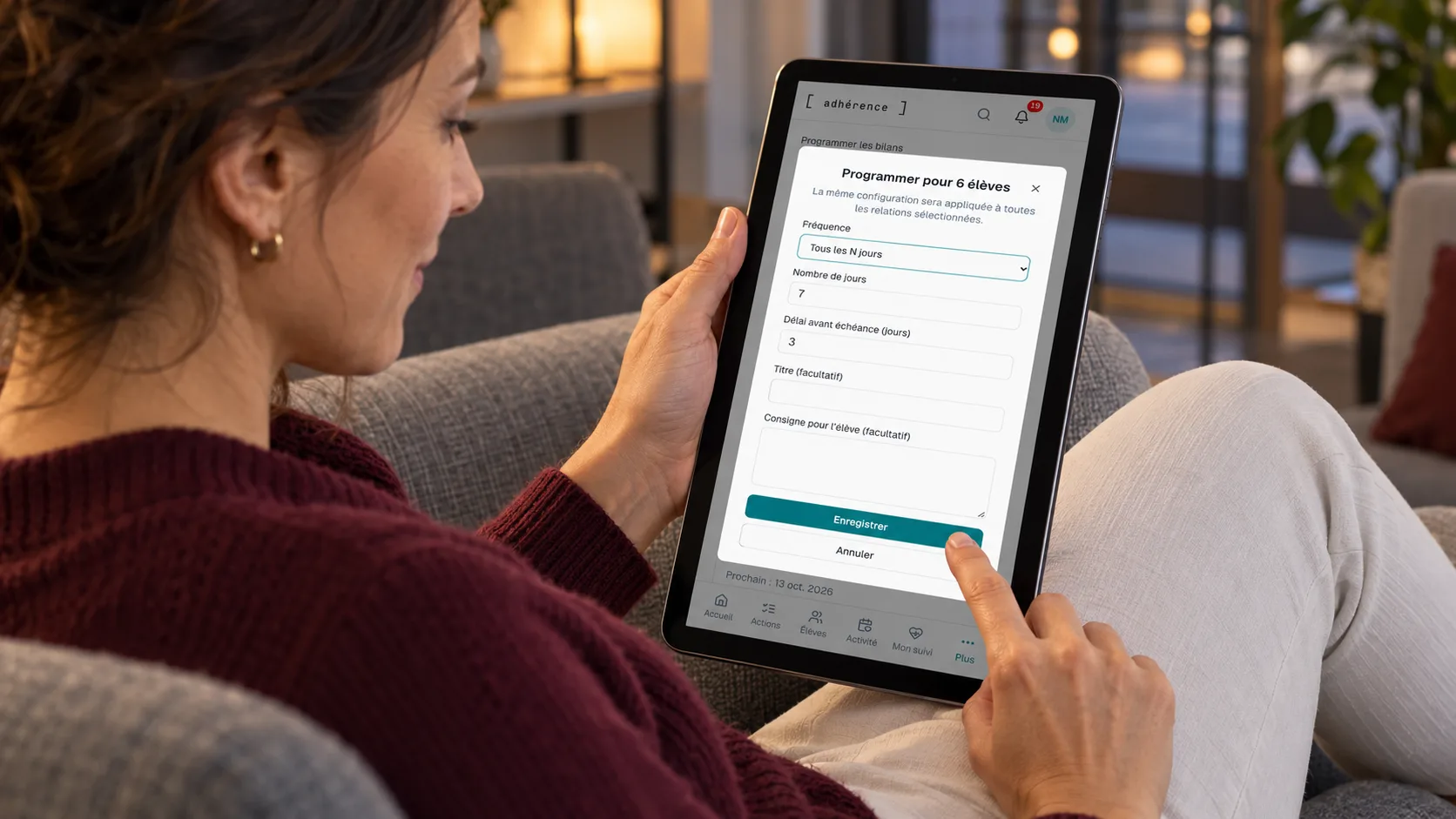
Adhérence check-ins can be requested individually or scheduled with a client-specific cadence. Define questions, an interval or monthly rhythm, and the response deadline. Similar settings can provide a starting point while preserving an arrangement suited to each coaching relationship. Choose the rhythm through the service and the information you will actually read.
A schedule prepares future requests; it does not mean a new check-in appears immediately after every click. Existing open requests and paused schedules affect what happens next. Check the displayed next date and current requests, especially when changing the rhythm or resuming a relationship. Use the interface’s actual state rather than assuming each change generates another form immediately.
The weekly check-in guide helps select questions that inform a decision. Do not turn every available observation into a required field. A focused request that receives a considered response can fit the service better than a lengthy questionnaire sent to everyone without accounting for the person’s circumstances or agreed review needs.
How should you interpret follow-up priorities?
Adhérence priorities group information that deserves your attention. They provide an entry point into the relevant activity or source record. Missing visible workouts, an outstanding request or an overdue item requires a check; the signal alone cannot explain the client’s whole situation or determine why that observation appeared at this particular point.
Open the context before deciding. Someone may have trained without recording it, agreed a different arrangement with you or encountered a technical problem. The next action could be a question, clarification or programme review. A standard reminder does not automatically suit all those circumstances, even when the initial signal looks similar in the overview.
Keep track of what you already did. Knowing about a previous contact helps prepare another conversation without repeating the same message. The monthly review can connect observations across a period and examine whether earlier decisions were practical for the client. A visible signal is the beginning of that reasoning rather than its completed conclusion.
Which reminders and messages should you distinguish?
A request notification, a deadline reminder and a group announcement serve different purposes. Explain the purpose and choose a relevant audience. In Adhérence, trainer announcements are sends confirmed by the trainer. They should not be described as an automatic conversation or a universal recurring campaign that handles every client communication without further attention.
For payments, establish the current situation before additional contact. Money received elsewhere but not recorded can create a misleading context. The overdue payment guide explains verification and adaptable messages. A reminder should correspond to a real outstanding amount and the agreed terms rather than an assumption based solely on an old entry.
Sending a message does not establish that it was read or understood. Notifications also depend on the person’s device and permissions. Offer a channel and response period you can maintain. When a question prevents the planned workout, clients should know how to contact you without relying on an assumed immediate automatic response or immediate delivery on every device.
Write a complete sentence for each automation: “This rule requests this information from this person at this time so that I can perform this review.” If the last part is missing, begin by organising how you will read and use the response.
How can you test before expanding an automation?
Choose a request with a simple purpose, such as understanding an obstacle affecting a planned workout. Configure cadence and deadline, then check the next occurrence shown. Test the response journey and identify where the received check-in will appear for your review. Confirm the process before applying the same arrangement to a larger group of people.
Prepare an exception as well. What happens when a client is paused, an earlier request remains open or the agreed rhythm changes? Checking those circumstances helps establish actual behaviour. The purpose is a useful service trial rather than generating large amounts of artificial activity that appears impressive while leaving the underlying process unclear.
In a fictional example, a trainer schedules check-ins for several clients. She notices that two questions repeat information already available in the log and that her review happens too late after the deadline. She simplifies the questions and moves her reading slot. She does not infer universal time savings or measured retention improvements from this small trial.

How can you assess usefulness for both people?
Observe the complete journey: an intended request, usable response, completed review and understood next action. The number of reminders sent cannot establish coaching quality. A less frequent request may fit better when its answer is clear and receives attention consistent with the service described. Evaluate what the process helps you understand rather than counting messages alone.
Ask the client a simple question: do they know what is expected and why the request matters? Record which tasks remain manual and which exceptions require your attention. You can then retain the rule, change its timing or return to individual requests for some circumstances. A flexible process should remain understandable as the relationship and the client’s needs evolve.
How should you frame data and available features?
Explain which information is used and its purpose. The CNIL’s core principles provide references for proportionate collection and clear information. Having a rule available does not justify collecting details unrelated to the agreed service or that you cannot interpret. Begin with the information necessary to prepare the intended conversation and action.
Check feature scope on Adhérence pricing. The personal training software page describes the wider journey; your trial should use functions actually available in your setup. Scheduled requests, reminders and optional summarising support have different frameworks. They do not imply autonomous adjustments to training prescriptions or loads whenever a new response arrives.
To begin, create an account and prepare one programme with a short check-in. Starting without a credit card lets you examine the organisation before expanding. Invited client accounts are free. Choose the relevant scope afterwards according to available functions and the people you support, using a tested service journey rather than a general list of automation possibilities.
Checklist for automating a first task
Frequently asked questions
What should a personal trainer automate first?
Choose a repeated task with an understandable rule, such as a check-in request whose responses you know how to review. Define recipient, cadence, deadline and your next action. The starting point depends on the service rather than the number of messages the software could potentially send or display as activity.
Do reminders replace contact with the client?
They can make a request or deadline visible. Context, understanding and the coaching decision still need review. A missing response has several possible explanations. Plan suitable contact when the initial signal cannot establish the situation or the person’s actual need, and avoid treating a notification as proof of a completed conversation.
Does Adhérence automatically change programmes?
This guide describes requests, reminders and priorities for trainer review. It does not describe autonomous programme or load changes. The trainer checks the work and circumstances, then decides what should remain, be clarified or be adjusted with the client. Keep that distinction clear when explaining what automation contributes to your service.
Key takeaways
Automate a task whose rule you understand and whose next step you can handle. In Adhérence, start with a check-in request, verify the response journey and organise reading time. Reminders and priorities support continuity when both people know which action is expected and how the resulting information will be used in their coaching relationship.
Sources
- The six core GDPR principles · CNIL
- The trainer and client journey in Adhérence · Adhérence
- Adhérence plans and features · Adhérence
Keep reading
Two related guides for turning an observation into a sustainable tracking method.